Writing
28 March 2026
The best way to ship widgets
How you can use vue to spit out web components
Web components · Vue · Web development · Javascript · Widgets
Sometimes you need to put a part of a website into another website.
I’m gonna call this a widget. Think something like:
- a support popup (Intercom)
- comment element (Disqus).
- anything else that enhances a website with low effort from the web dev.
Something that’s:
- embeddable into other websites
- nicely consumable (ideally in a few lines of code)
- nicely configurable (ie: “props” that you could pass in like you would a React component)
- doesn’t leak out of the website or allow the website to leak in (nicely scoped)
- framework agnostic (ie: I can gooi it in anything with relative ease)
The problem
Traditionally, embedding these “widgets” on your site gets distributed by means of:
- yucky iframes (not very extensible)
- framework-specific components (large support surface)
Non of these feel particularly great imo.
Enter web components
A while back, after fighting with yet another yucky widget experience, I worm-holed a bit on if there was a better solution to shipping widgets.
Turns out web components are an absolutely GOATED solution for this use-case. They basically provide an answer for all of the above requirements! (scoped while still offering control). As an experiment, I wanted to see how I could ship one!
The problem
As an experiment, I was keen to build a personal income statement generator that anyone can embed in their site!
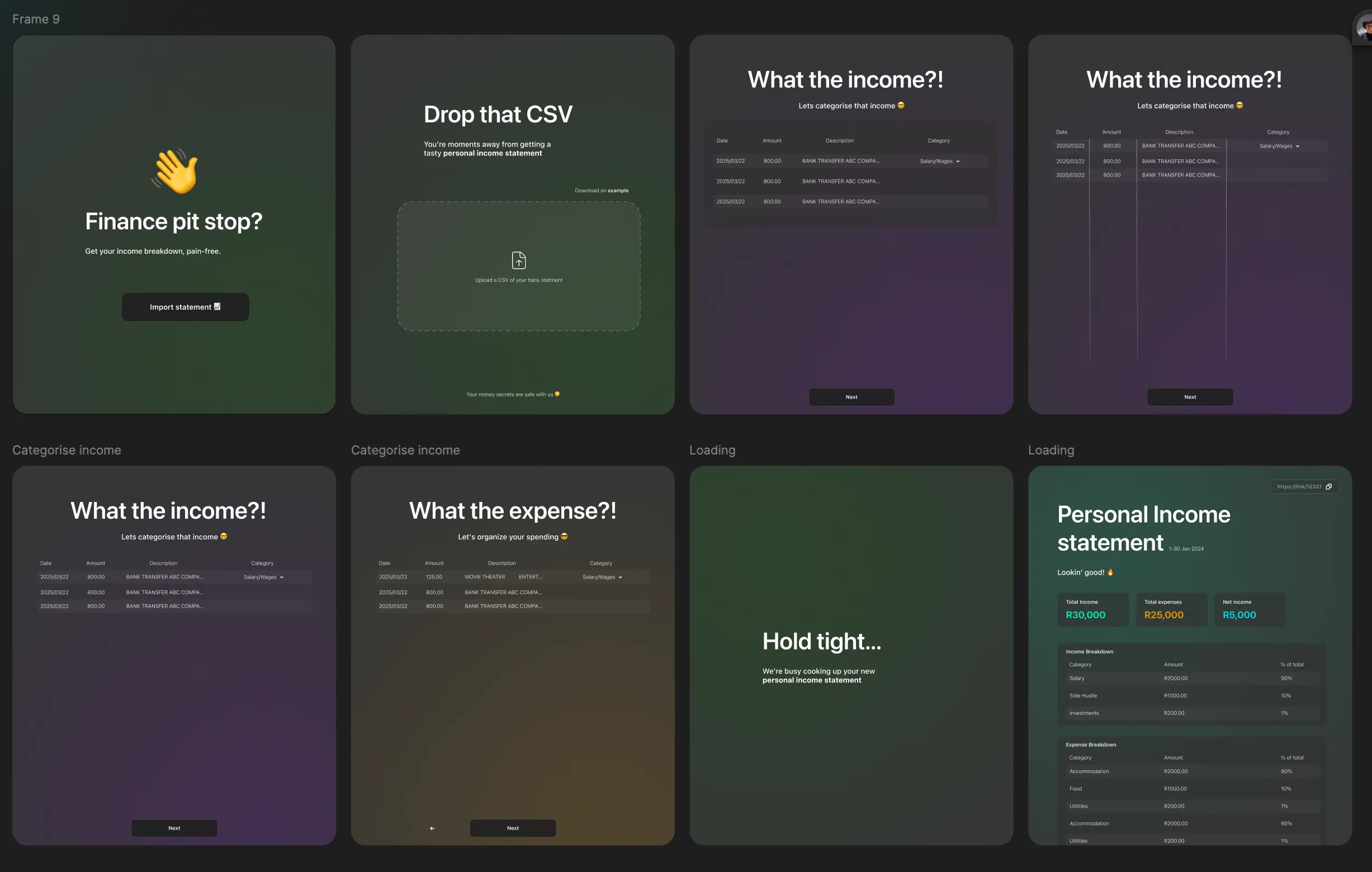
Vue 🤝 web components
When I was playing with this idea in early 2025, I was learning Vue - mostly just out of curiosity to see how the DX stacked-up against my React and Svelte experiences. I was really enjoying it.
As a nice cowinkydink… turns out, the vue vite plugin has this gem:
   vue({
      template: {
        compilerOptions: {
          isCustomElement: (tag: string) => tag.includes("-"),
        },
      },
      customElement: true,
    }),
along with this bangin util from vue:
// Convert Vue component to custom element
const CustomComponentElement = defineCustomElement(FlowVue, {
  configureApp: (app) => {
    app.use(pinia);
  },
  shadowRoot: true,
  // Since FlowVue doesn't import our tailwind main.css,
  // we add it here, which inserts the all the styles as an inline
  // <style> tag to the shadow root - which allows them to be scoped to this component.
  styles: [mainCssText, ...(FlowVue.styles || [])],
});
which allows use to bundle our vue app entrypoint as a freaking web component 🤯
Show me the 💸
Yeah yeah.. you wanna see the thing… well here it is (I called it flowvue), embeded straight into this Astro website, have a play around!
Cool hey!? In particular I love what vue’s built-in Transition component enables for easy entrance/exit animations.
This is all I had to do:
<script type="module" src="https://flowvue.rad.gdn/dist/flow-vue.js"></script>

<flow-vue />
👏👏👏
Sorry about initial layout shift, I didnt quite get the SSR bit right since that would depend on web-component server rendering on the consumer site somehow. If you look at the marketing site you’ll see it doesnt ‘jump’ because the vue component is getting SSR’d directly via Nuxt .
Tech
- The web component bundles the
FlowVuecomponent into aflow-vueweb component - which works as a mini-app and nicely seperates itself from the rest of the user’s website. See the entrypoint code here . Very simple, just registers the web component withcustomElements.define("flow-vue", CustomComponentElement). - The nuxt marketing site uses the
FlowVuecomponent directly (since we know we’re already in a vue app with mostly the same deps)
You can suss out all the code/tech stack here - some cool stuff including code-splitting from within the web component bundle! 🤯 This shows a loader while the next chunk (ie: the next page) loads-in, very cool!
Thanks for reading thus far, stoked you enjoyed reading us much as I had making this thing! 😎🔥
Hope ya stick around to read some more of my stuff.
See ya! 🚶💨🔥